
Now Available
919PHONE
The lightest FiveM phone.
The lightest price.
Built for roleplay - not for copying an iPhone.
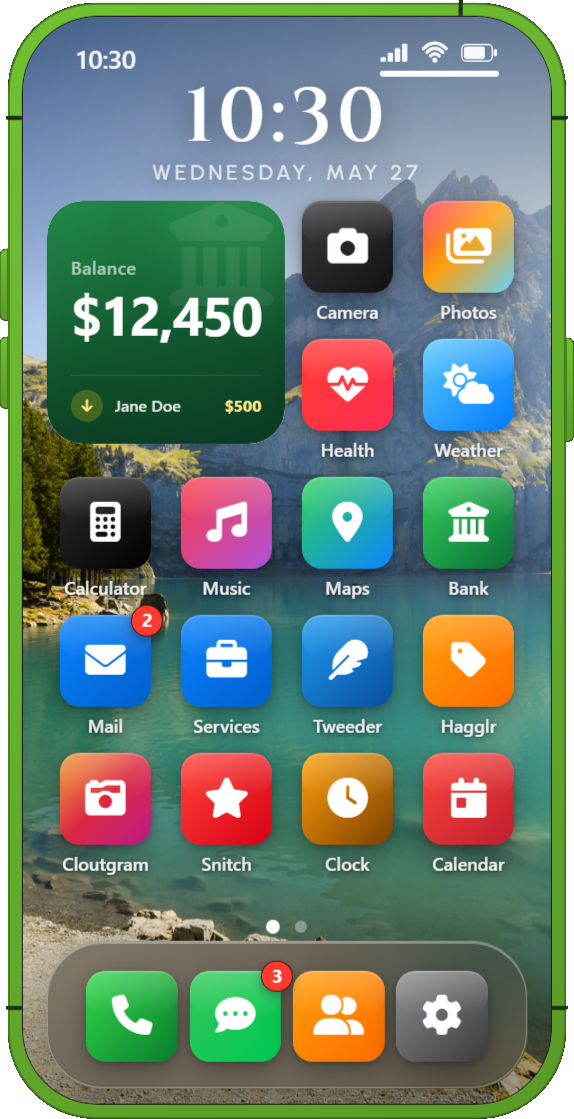
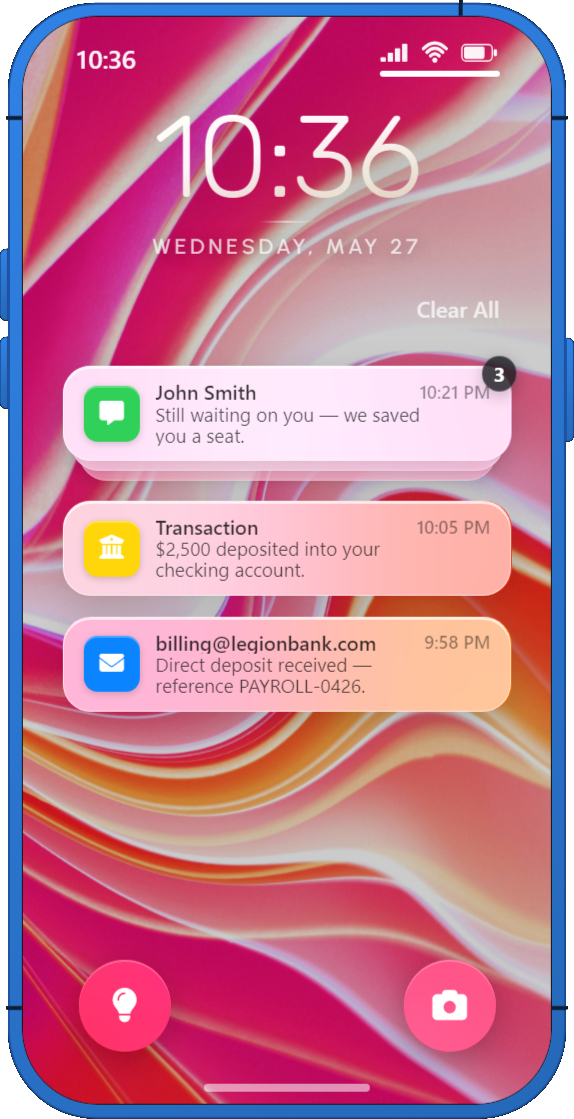
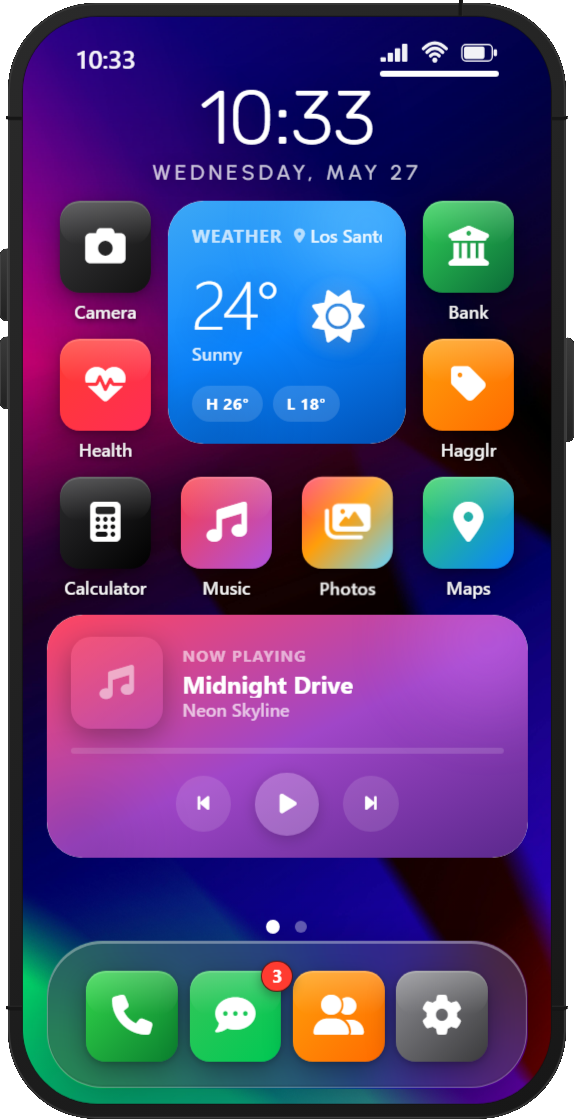
Most FiveM phones ship as bloated all-in-one packages: dozens of apps you never use, a UI that fights your game, and a price tag that treats every server the same.
919PHONE takes the opposite approach.
You get a fast, Svelte-powered smartphone core with 22 built-in apps, optional add-on packs, and a full developer SDK - then you only pay for what your server actually needs. No filler. No dead weight.
Why 919PHONE Wins
Three pillars.
Zero compromise.
Lightest phone in FiveM
By design, not by accident
- Svelte 5 + Vite: compiled UI, minimal JavaScript shipped to NUI
- Smooth open/close animations: slides in like a real device
- App transitions that feel native to GTA, not a desktop browser
- Walk while open - players stay in the world
- Configurable phone size, frame color, and brightness
- Intelligent offline behavior for maps, banking, and social apps
Lightest price
Pay for what you use
- Core phone resource - communication, utilities, banking, maps, camera
- Optional add-on packs - install only what your server needs
- Third-party SDK apps - community apps via the App Store
- Per-app server toggles - disable any app in config.lua
- You don't subsidize features you'll never turn on
Better than the rest
We studied what works, then adapted it for a video game
- Faster interactions, fewer taps to common actions
- Notification peeking without fully opening the phone
- Control Center reachable from anywhere
- Auto-detects QBox, QBCore, ESX - zero manual bridge wiring
- Full moderation pipeline with Discord and FiveManage logs
22 Built-In Apps
Everything players expect.
Nothing they don't.
Core Communication

Phone
Full calling suite with pma-voice, voicemail, call history, caller ID, and blocked numbers.

Messages
Thread-based texting with groups, read receipts, typing indicators, and photo attachments.

Contacts
Save, edit, and organize contacts with avatars, favorites, and nearby contact sharing.

In-city email with configurable @celltowa.com addresses, unread badges, and system senders.
Money & Jobs

Bank
Live balances, P2P transfers, payment requests, transaction history, and job invoices.

Services
City service directory - dispatch calls, text availability, and on-duty worker counts.
Social & Marketplace App Store
These apps ship with 919PHONE but install through the App Store - players opt in, keeping fresh characters clean.

Tweeder
Los Santos microblogging with replies, likes, profiles, photos, and moderation.

Cloutgram
Photo-first social with carousels, 24-hour stories, comments, and explore feed.

Hagglr
Classifieds marketplace - post listings, browse, contact sellers, and report.

Snitch
Business review platform - star ratings, reviews, photos, and a configurable catalog.
Media & Utilities

Camera
Live viewfinder, photo & video capture, landscape mode, FiveManage uploads.

Photos
Gallery for all captured and uploaded media, used across all social apps.

Maps
Interactive GTA map with Atlas, Satellite, Standard layers, POIs, and waypoints.

Music
In-phone music player with Control Center controls and background playback.

Clock
World clock, alarms, stopwatch, and timer with server-synced deadlines.

Calendar
Personal event calendar with color-coded entries, persisted per character.

Notes
Quick notes with title, body, preview - server-validated, stored per character.

Calculator
Clean calculator app for in-character math.

Health
Live hunger, thirst, stress stats from your framework. Home screen widget.

Weather
Current conditions and multi-day forecast for immersion.
System

Settings
Passcode, themes, wallpapers, 12+ frame colors, ringtones, DND, animations, and more.

App Store
Browse, install, and uninstall apps. Featured tab, search, and offline state.
Phone Experience
Built for RP.
Feels like a real device.
Lock Screen & Control Center
Swipe up to unlock with optional passcode. Instant access to Wi-Fi, Bluetooth, airplane mode, flashlight, camera, music controls, and nearby contact sharing.
Notification Center
Grouped notifications with clear-all, deep links into the relevant app, and banner peeking when the phone is closed.
Home Screen
Multi-page grid with drag-and-drop arrangement, app folders, customizable dock, and live widgets for Calendar, Weather, Health, Banking, Mail, and Music.
First-Run Setup
New characters get a setup wizard - passcode, preferences, and a phone number assigned automatically on first open.
In-World Presence
Optional hand prop during phone use and calls. Phone item requirement supported across major inventories.
The Competition
See the difference.
| 919PHONE | Typical FiveM Phones | |
|---|---|---|
| UI framework | Svelte 5 - compiled, minimal runtime | React/Vue bundles with heavy overhead |
| Design philosophy | Game-first UX, RP-optimized flows | iPhone cosplay with poor UX |
| App model | 22 core apps + optional packs + SDK | Fixed bundle, hard to trim |
| Framework & inventory support | Auto-detects QBox, QBCore, ESX + 6 most popular inventories | Difficult integrations and manual configuration |
| Developer story | Full SDK, app template, iframe isolation | Limited or none |
| Customization | Open bridge, config, locale - no recompile | Locked or scattered across files |
| Home screen | Widgets, folders, drag-and-drop layout | Static grid or basic icons |
| Moderation | Reports, blocked words, admin tools, logs | Varies / often missing |
Add-On Packs
Extend the phone.
Zero bloat in the core.
Add-on packs are separate resources that plug into 919PHONE through the App Store. Only ensure the packs you want - players install what they want.
Games Pack 1
Snake, Flappy, 2048 - classic mini-games that install from the App Store and save high scores server-side.
Games Pack 2
Block Stack, Brick Breaker, Mine Sweep - more mini-games running in isolated iframes with persistent scores.
Garage App
Manage your vehicles directly from the phone - view, locate, and interact with your garage from anywhere in the city.
Housing App
Browse properties, manage your home, and interact with housing features - all from your phone.
Developer SDK
Build apps.
Ship them fast.
Build custom phone apps in separate FiveM resources without forking the phone. Your garage script, gang app, or delivery tracker becomes a first-class phone app - not a hacky browser overlay.
Performance
Built to stay out of the way.
Svelte-compiled UI
Minimal JavaScript shipped to NUI - no virtual DOM overhead.
Targeted data loading
Apps fetch what they need, when they need it - no bulk loading.
OneSync-ready
Built for modern FiveM server stacks from day one.
Auto framework detection
Zero manual bridge wiring for QBox, QBCore, ESX.
Open editable bridge
Customize money, jobs, items, stats without waiting for updates.
Full locale file
Translate every string without touching UI code.
Requirements
What you need.
Dependencies
- FiveM server artifact 25770+
- MariaDB via oxmysql
- OneSync enabled
- ox_lib
- pma-voice (voice calls)
- FiveManage API key (camera, gallery, media)
Frameworks auto-detected
- QBox - qbx_core
- QBCore - qb-core
- ESX - es_extended
- Standalone - falls back to no framework mode
Inventories auto-detected
- ox_inventory
- qs-inventory
- origen_inventory
- codem-inventory
- tgiann-inventory
- ps-inventory
- Framework default inventories
Quick Setup
amzn_smartphone into your resources folderphone.sqlensure amzn_smartphone after framework, inventory, and voiceconfig.lua and config_s.luaphone item to your inventoryLive Preview
Try 919PHONE
Explore the full phone UI right in your browser. Tap around apps, settings, and more.
Get 919PHONE.
Twenty-two apps. Optional add-on packs. Unlimited SDK extensions. One lean core that doesn't punish your players' FPS or your wallet.
$59.99 USD
919PHONE - by 919DESIGN